


DISCOUNTMYMOBILE · BUYER'S GUIDE
Choosing the Right Monitor
and your replacement parts
LCD, OLED, original, compatible… Find the key information you need to understand the different product lines and choose the right part for your device.
Three different criteria to check
Technology describes the display (LCD or OLED). The product line indicates the origin or the stated grade of the part. The chassis is the mounting bracket. An OLED screen can therefore be sold with or without a frame.
The product description and the selected option specify the features and contents actually delivered.
01 · UNDERSTANDING THE DISPLAY
Display Technologies
LCD · BUDGET
TFT / LCD / IPS
A backlit display. IPS refers to a type of LCD panel technology. If you're considering a phone that originally featured an OLED display, check the advertised differences before choosing an LCD version.
LCD · TOUCH INTEGRATION
Incell HD+
LCD with a built-in touchscreen, typically available in an affordable price range. The exact resolution for your model is yet to be confirmed.
LCD · DEFINITION
Incell FHD / LTPS
Full HD resolution LCD, depending on the model; LTPS refers to the panel's transistor technology.
OLED · RIGID MOUNT
Hard OLED
OLED panel built on a rigid substrate.
OLED · FLEXIBLE DISPLAY
Soft OLED
OLED panel on a flexible substrate. The assembled display must not be bent.
OLED · NAMES
AMOLED / Super AMOLED
Terms related to OLED displays. These terms alone do not prove that a replacement part is an OEM part.
02 · UNDERSTANDING THE ORIGIN
Part lines
These terms help you understand a product sheet. Their availability and features depend on the part number.
MANUFACTURER'S ORIGIN
Original Service Pack
Manufacturer-supplied part in its original packaging.
ORIGINAL + BLEND
Originally Assembled
Original screen mounted on a compatible frame.
REMANUFACTURED
Original Refurbished
Refurbished original board, with components replaced as specified by the part number.
REEMPLOYMENT
Original Pulled
Original part salvaged from a dismantled unit.
AUTHENTICITY
Genuine / Original
Refers to a part that is advertised as an original manufacturer's part.
NAME TO BE VERIFIED
OEM
Check the origin and the specifications listed in the product sheet.
COMPATIBLE
Premium / Premium Plus
Commercial trim levels; features and warranties as listed in the spec sheet.
REPLACEMENT
Aftermarket / Compatible
Aftermarket replacement part not manufactured by the original equipment manufacturer, with varying specifications.
The right thing to do: Compare the technology, resolution, brightness, and advertised features. A label such as “Premium” or “OEM” is not enough to guarantee that the screen is fully equivalent to the original one.
The names listed in this guide do not imply any specific warranty: please review the terms and conditions applicable to your purchase.
03 · THE SCREEN MOUNT
Framed or frameless displays: What's the difference ?
The chassis, also known as the “frame,” is the frame or support on which the screen rests and is mounted. It forms the housing for the display assembly. It is neither a protective case nor necessarily the phone's rear glass panel.
With frame
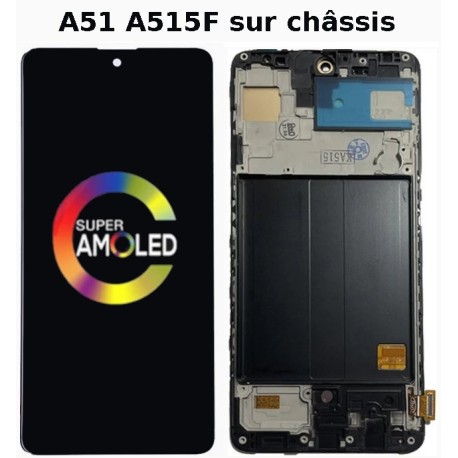
At the rear, you can see the mounting frame with its housings and mounting points. The screen is already mounted on this stand.
Without a frame
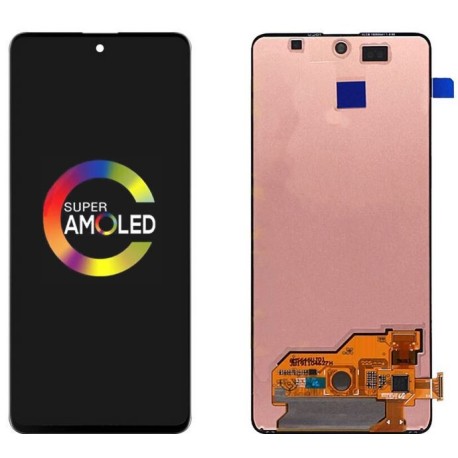
In the back, you can see the the back of the tile and its backing mat, without the mounting frame. The display assembly must be attached to the phone's original chassis.
Illustrative comparison for the Galaxy A51. The shape of the chassis and the included components vary depending on the model and the selected option.
WITH FRAME
The screen is already mounted on its stand
You will receive a screen-and-frame assembly. This version eliminates the need to glue the new screen onto the old frame, but generally requires you to transfer the phone’s internal components.
WITHOUT FRAME
You keep your phone's case
The windshield must be mounted and glued to your existing frame after removing the old windshield and preparing the mounting surface. The mounting surface must be in good condition, clean, and undamaged.
Is your frame bent or damaged ? Check which chassis version is compatible with your model. Is your frame intact ? The frame-less version may be suitable if you're comfortable with disassembly and gluing.
Please note the following regarding the content: "With frame" does not mean a complete phone. The battery, buttons, earpiece, sensors, and adhesive pads are included only if specified in the listing.
04 · UNDERSTANDING A DATA SHEET
Useful Terms
EDITING
Full screen / glass only
A complete screen typically consists of both the display panel and the touchscreen. A glass panel alone does not constitute a complete screen and requires specialized equipment to be replaced.
ELECTRONICS
COG / COF / FOG
Terms related to the assembly of chips and display panels.
DIMENSIONS
Original Size / Big Bottom
Original dimensions / thicker bottom border.
COMPATIBILITY
Diagnosis / Transferable IC
Some service bulletins specify specific electronic procedures. Whether a system message appears depends on the model, the software, and the repair procedure.
COSMETIC CONDITION
Grades A, B, and C
Exterior condition rating; see the seller's definition.
REEMPLOYMENT
PIEC
Product from the circular economy.
05 · BEFORE ORDERING
Your Four-Point Check
01
The exact model
Compare the phone's technical model number. Two devices with similar names may use different parts, particularly in 4G or 5G versions.
02
The selected option
Check the technology, color, and frame availability in the product page options.
03
Functions
Check the specifications for the touchscreen, fingerprint reader, and refresh rate, when provided.
04
The Montage
Follow the guide specific to your model. Test the display and touchscreen before permanently attaching them, taking care not to strain the flex cables.
Ready to find the right part ?
Not sure about the part number or chassis? Ask for advice, providing the exact model of your device.
View Screens and PartsContact Support


